A long caption can be useful and still be hard to read. The problem is often not its length: the opening, explanation, product details, and invitation arrive as one block. A few deliberate breaks can show readers where one thought ends and the next begins.
This is a writing and review workflow, not a formula for reach. Use it when a post needs more than a one-line caption: a tutorial, an outfit breakdown, a book excerpt, or an answer to a question your audience asked.
01
Write the useful point before you format
Open with the reason to keep reading. For an outfit post, “The jacket is oversized; here is how I sized it” tells a reader more than “New look.” For a guide, name the problem it solves. Keep the opening accurate to the image or video; a dramatic first line that never pays off wastes the reader’s time.
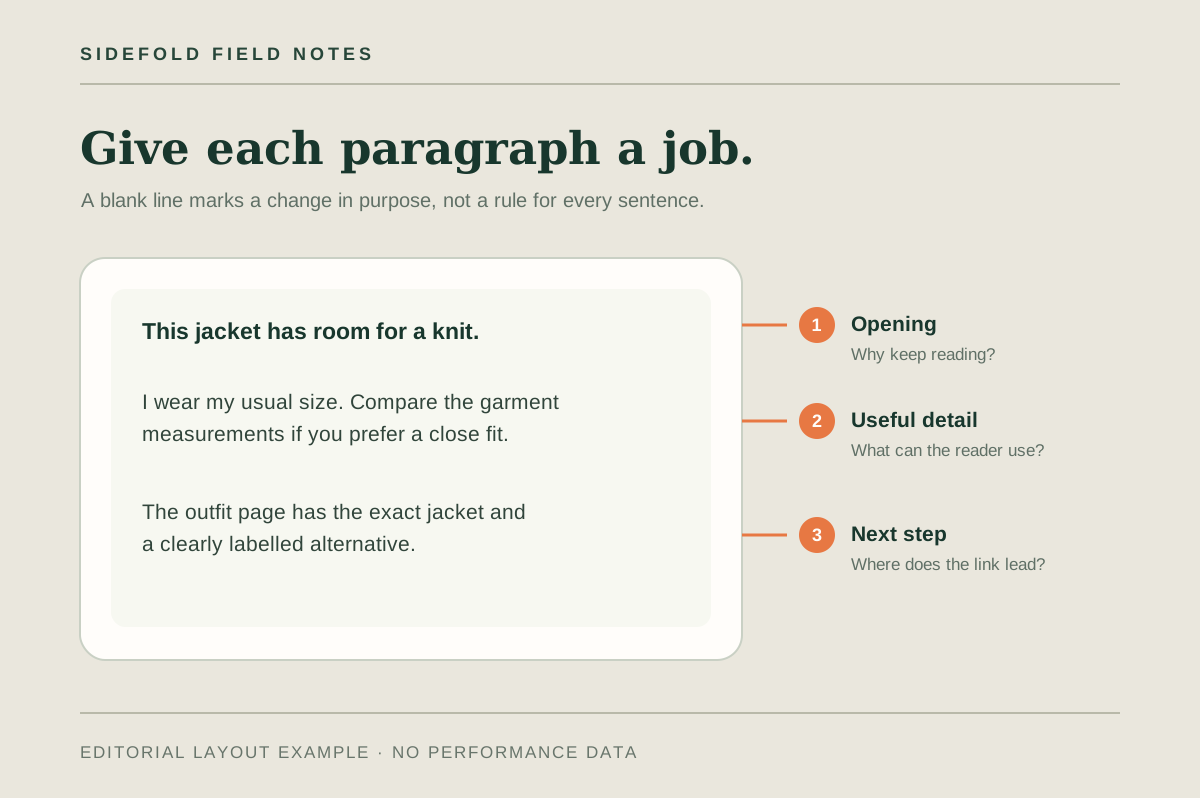
Then draft the rest without worrying about perfect line breaks. Ask what someone needs to know after seeing the post. The diagram above uses three jobs for the text: opening, useful detail, and one next step. It is a planning aid, not a required Instagram template.
“This jacket looks structured, but the shoulders are roomy.
I wear my usual size with a knit underneath. If you prefer a close fit, compare the garment measurements with a jacket you already own.
I listed the exact jacket and a clearly labelled alternative on the outfit page.”
02
Give each paragraph one job
Start a new paragraph when the reader moves to a new idea: the recommendation, a limitation, a measurement, or an action. A blank line between every sentence can make a connected explanation feel fragmented; no breaks at all can hide the part someone came for.
Put essential qualifications beside the claim they qualify. If an alternative product is only similar in color, say so next to that link. If the post involves a commercial relationship, do not push the disclosure below a long wall of text. Meta’s branded content guidance describes when its paid partnership label is required; also check the rules that apply to your own promotion.
Make the final invitation specific. “See the fabric and size notes in my outfit page” gives a reader a reason to tap. If the caption points to a bio link, our link order guide helps match that label and destination to the post.
03
Clean the spacing without changing the message
- Paste your draft into Sidefold’s free caption formatter. The draft stays in the browser tab; the tool does not save it.
- Choose Clean spacing to remove trailing spaces and reduce runs of empty lines to one blank line. Choose Readable spacing if you want a blank line between existing text lines. Read the result: a tool cannot decide which sentences belong together.
- Check the live character, word, hashtag, mention, and line counts. The Instagram caption and bio numbers in the tool are presets, so confirm the current limit in the publishing app. The counter does not predict where Instagram will truncate a preview.
- Copy the formatted caption, paste it into the actual post composer, and review it there before publishing.
Keep hashtags relevant to the post rather than using the count as a target. Instagram’s hashtag help is the place to check its current rules; the counter simply reports what is in your draft.
04
Check what a reader actually sees
Before you share, look at the caption on a phone: is the main point visible early, can the reader find the practical detail, and does the next step name its destination? After publishing, open the post again. A copied line break can display differently in a composer or feed, and a preview may show only part of the text. Edit for the real view if needed.
Do not treat a clean caption as a substitute for the page it promises. If you invite people to a product, guide, or free resource, open the link yourself and confirm it still leads to the right place. For affiliate recommendations, use the affiliate-link guide to check the handoff from post to product page.
05
Common questions
How many blank lines should I put in an Instagram caption?
Use a blank line when the caption changes purpose, such as moving from the opening to an explanation or from the explanation to the next step. There is no universal number that makes a caption readable.
Will blank lines increase the reach of my post?
Spacing can make text easier to scan, but it does not guarantee reach. Judge the caption by whether a reader can understand the post and find the promised detail or action.
Can I put hashtags and mentions on their own lines?
Yes, if it helps the caption read naturally. Keep any important context and commercial disclosure where a reader can notice them, and check Instagram's current guidance before publishing.
Format one caption you are about to publish.
Keep the words that matter, make each paragraph useful, and check the final phone view.